
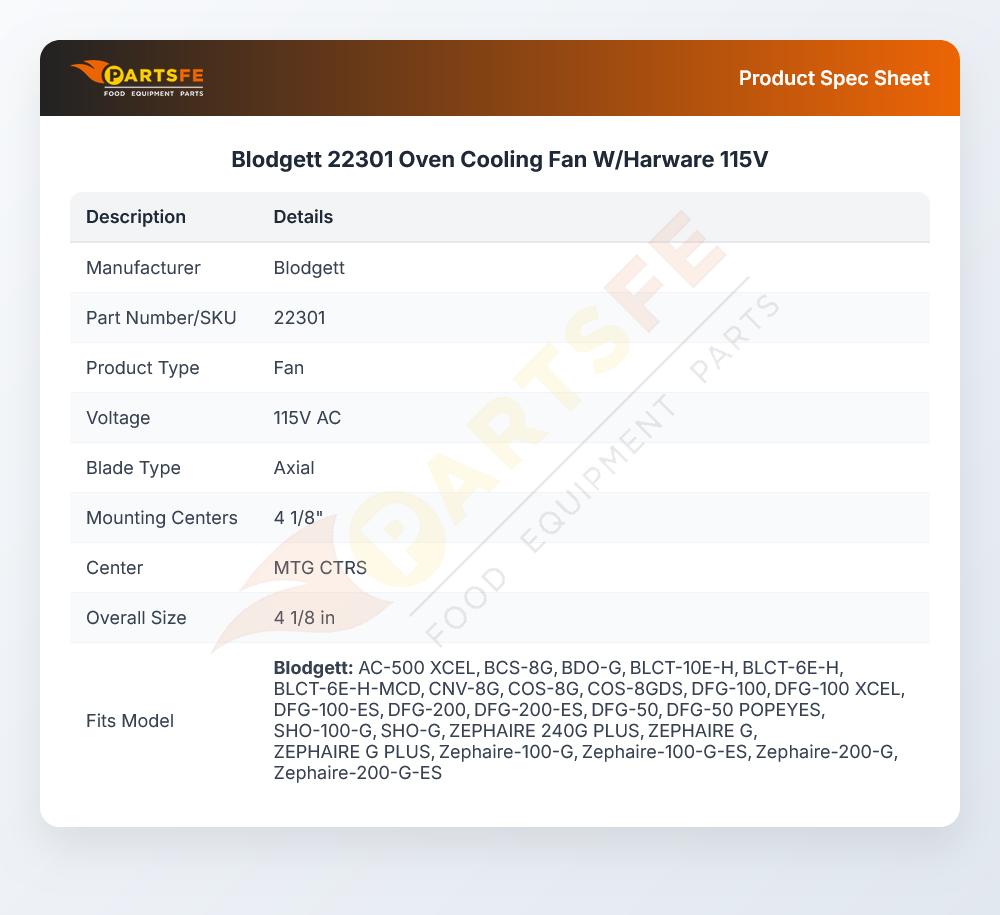


Blodgett 22301 Oven Cooling Fan W/Harware 115V
Specifications:
- 115V, Low Velocity Axial Fan W/Harware
- 4 1/8" Mtg Ctrs
- Blodgett Model: Dfg 100 Xcel, Dfg 1 Xl
Description
Dimensions:
- Weight: 1.5 lbs
- Length: 4.7 in
- Height: 1.5 in
- Width: 4.7 in
This Part Fits the Following Models
25 modelsStep1: Turn off main breaker, unplug oven, and confirm no voltage.
Step2: Allow oven to cool completely before servicing.
Step3: Remove rear access panel to reach cooling fan assembly.
Step4: Disconnect old fan wiring and note connections for reinstallation.
Step5: Install new fan using hardware, ensure tight secure mounting.
Step6: Reconnect wiring per diagram, replace panel, restore power, and test airflow.
-
What maintenance is required for the Blodgett 22301 Fan?
Clean oven cooling fan blades and housing regularly to prevent grease buildup and airflow restriction. Inspect wiring and motor connections for wear or looseness. Ensure proper ventilation and secure mounting to avoid vibration damage. Replace worn components promptly for safe operation.
-
What are common issues with the Blodgett 22301 Cooling Fan?
- Motor overheating or failure due to continuous operation.
- Reduced airflow from dust or grease buildup on blades.
- Excess vibration caused by loose mounting or worn bearings.
- Electrical faults leading to intermittent or no operation.
Customer Reviews
Write a Review
-
Affordable
Perfect size and works really efficiently
We strive to provide our customers with a hassle-free and efficient shopping experience. Our shipping policy ensures the timely delivery of your orders and complete customer satisfaction. View More
We are committed to ensuring your complete satisfaction with every purchase. We understand that circumstances may arise where you must return a product or request a refund. If for any reason you are not satisfied, you may return the item(s) according to the terms outlined below. View More
This Payment Policy outlines the terms and conditions governing all payments made for products purchased through our website. By making a purchase, you agree to be bound by this Payment Policy. View More