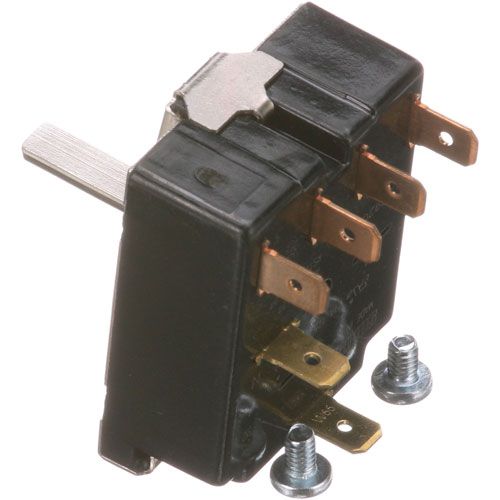
Blodgett 20347 Oven Mode Selector Switch
Specifications:
- Mode Selector Switch Used For Cook & Hold.
- 21A-125/250V, Revolves All The Way Around,
- Used On Cook&Hold Units After Jan 85
- Knob For Selector Switch Blo24684, # 22-1621
- Blodgett Ctb, Ctbr (After 9/86), Dfg, Mark V
- Ctb, Ctbr, Dfg-100, Dfg-200, Dfg-50, Mark V, Mark V Series
Description
Dimensions:
- Weight: 0.2 lbs
- Length: 2 in
- Height: 2.2 in
- Width: 1.6 in
Step1: Turn off power and unplug oven to ensure electrical safety before starting.
Step2: Remove control panel cover using proper tools and note wiring layout carefully for reference.
Step3: Disconnect old selector switch wires carefully, noting terminal positions to avoid miswiring later.
Step4: Install new switch into mounting bracket securely, ensuring it aligns with control panel opening.
Step5: Reconnect wires matching original configuration exactly according to labeled terminals and diagram.
Step6: Reassemble panel and restore power carefully, then test all oven modes for proper operation.
-
What maintenance is required for the Blodgett 20347 Mode Selector Switch?
Regularly inspect the selector switch for loose connections, heat damage, or worn contacts to ensure accurate oven operation. Keep the switch area clean and free from grease buildup that may interfere with performance. Disconnect power before servicing to reduce electrical hazards. Periodically test switch responsiveness to help prevent unexpected mode selection failures.
-
What are common issues with the Blodgett 20347 Mode Selector Switch?
- Switch fails to change oven modes properly.
- Intermittent electrical contact causing inconsistent operation.
- Knob sticking or becoming difficult to turn.
- Burned or damaged internal contacts from heat exposure.
- Oven not responding to selected cooking settings.
Customer Reviews
Write a Review
-
Intuitive Switch
Versatile and efficient switch option
We strive to provide our customers with a hassle-free and efficient shopping experience. Our shipping policy ensures the timely delivery of your orders and complete customer satisfaction. View More
We are committed to ensuring your complete satisfaction with every purchase. We understand that circumstances may arise where you must return a product or request a refund. If for any reason you are not satisfied, you may return the item(s) according to the terms outlined below. View More
This Payment Policy outlines the terms and conditions governing all payments made for products purchased through our website. By making a purchase, you agree to be bound by this Payment Policy. View More