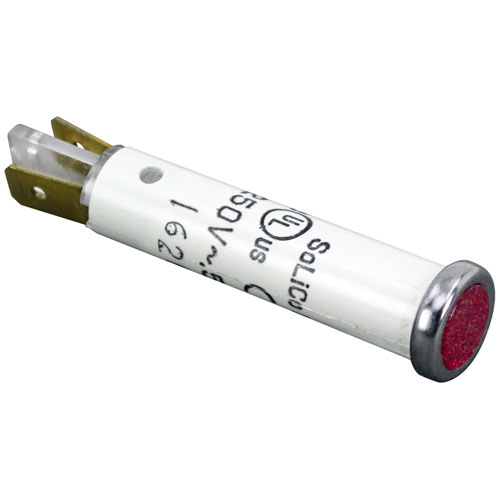
Vulcan Hart 00-342575-00001 Griddle Red Indicator Light 5/16" 250V
Specifications:
- Signal Light,
- 250 V [ Fits Hole 5/16" ] [3/16" Tabs ] [Color Red]
- [ Type Hat Flat ][ Bezel Chrome]
- [ Needs Fastener Clip # 26-2263 ]
- Hobart
Description
Dimensions:
- Weight: 0.1 lbs
- Length: 0.2 in
- Height: 2 in
- Width: 0.2 in
GENERAL ELECTRIC:
HOBART:
00-342575-1 00-825100 342575-00001 342575-1 824324-1 825100 HOB00-342575-1 HOB342575-1 XNC25X89/342575-1
VULCAN HART:
00-825100 342575-00001 342575-1 824324-1 825100 VH342575-1 VH825100
Step1: Turn off and unplug the appliance to prevent electrical hazards.
Step2: Remove the old indicator light from its bezel carefully.
Step3: Inspect wiring and mounting area for any damage.
Step4: Insert the new indicator light into the panel.
Step5: Reconnect wires securely, ensuring no exposed strands.
Step6: Tighten bezel screws, restore power, and test the light to confirm proper operation.
-
What maintenance is required for the Vulcan Hart 00-342575-00001 Indicator Light?
Clean the lens and bezel to remove grease or dust. Check the terminals for secure connections and ensure the light illuminates properly. Disconnect power before servicing.
-
What are common issues with the Vulcan Hart 00-342575-00001 Indicator Light?
- Light fails to turn on.
- Loose or corroded terminals.
- Lens or bezel damage.
- Flickering illumination.
Customer Reviews
Write a Review
-
Bright
Outstanding brightness and clarity
We strive to provide our customers with a hassle-free and efficient shopping experience. Our shipping policy ensures the timely delivery of your orders and complete customer satisfaction. View More
We are committed to ensuring your complete satisfaction with every purchase. We understand that circumstances may arise where you must return a product or request a refund. If for any reason you are not satisfied, you may return the item(s) according to the terms outlined below. View More
This Payment Policy outlines the terms and conditions governing all payments made for products purchased through our website. By making a purchase, you agree to be bound by this Payment Policy. View More