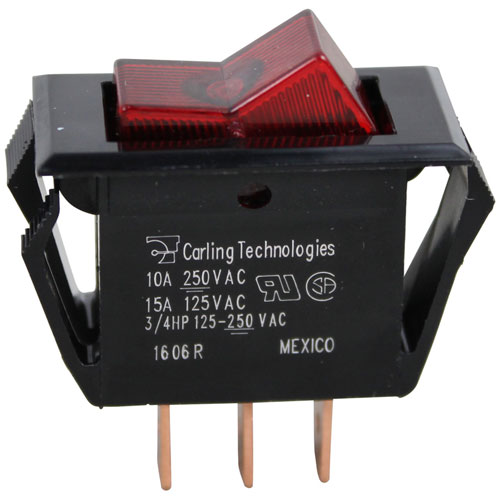

Bunn 12920.0000 Coffee Brewer Rocker Switch SPST Red Lighted On/Off 3-Terminal
Specifications:
- Rocker Switch ] [ Fits Hole 9/16" X 1-1/8" ] [ On/Off ]
- [ Spst ] [ Terminals 3 (1/4" Tabs) ] [ Amp/Volt
- 15A/125V,10A/250V, 125V Lamp ] [ Color Red Light/Black]
- Bunn-O-Matic Coffee C, Cdbc Series, Cdbc Twin, Cez, Cez
- Twin, Cez Twin Aps, Cezf, Combo Brewer, Crt5, Crtf5, Ct,
- Ctf, Cwaps, Cwaps-Mv, Cwt, Cwt Twin, Cwt-Aps, Cwt-Cs, Cwtf,
- Cwtf Twin, Cwtf-Aps, Cwtf-Cs, Cwtf-Mv, Cwtf-Tc, Cwtf-Twin,
- Cwts, Cwts-Mv, Cwtsr, Cwtsr-Mv, Single Cw, Single Cwtf,
- Twin-Aps, Twin-Tc, Vp17, Vp17B
- Merco Warmer
- Nemco Hot Dog Grill
- Prince Castle Grill Mini Clamshell: 920-D, 920-Sl.
- Roll-A-Grill (Connelly)
- Roundup Grill Hdc-20 (Old Style).
Description
Dimensions:
- Weight: 0.1 lbs
- Length: 1.5 in
- Height: 0.63 in
- Width: 1.38 in
This Part Fits the Following Models
73 modelsStep1: Disconnect power from the equipment before installation.
Step2: Remove the control panel cover to access the old rocker switch.
Step3: Label and disconnect the wire terminals carefully.
Step4: Push out the faulty switch from the mounting hole.
Step5: Insert the new rocker switch into the panel opening securely.
Step6: Reconnect terminals to matching positions and ensure tight connections.
Step7: Restore power and test the illuminated switch operation safely.
Customer Reviews
No reviews yet. Be the first to write one!
Write a Review
We strive to provide our customers with a hassle-free and efficient shopping experience. Our shipping policy ensures the timely delivery of your orders and complete customer satisfaction. View More
We are committed to ensuring your complete satisfaction with every purchase. We understand that circumstances may arise where you must return a product or request a refund. If for any reason you are not satisfied, you may return the item(s) according to the terms outlined below. View More
This Payment Policy outlines the terms and conditions governing all payments made for products purchased through our website. By making a purchase, you agree to be bound by this Payment Policy. View More