How to Reset a KitchenAid Dishwasher: The Ultimate Guide
KitchenAid dishwashers play a crucial role in a busy commercial kitchen, maintaining cleanliness and ensuring to work in smooth condition. However, most dishwashers will experience issues like flashing lights, incomplete cycles, and unresponsive controls. Understanding how to reset your KitchenAid dishwasher is necessary for minimizing downtime and avoiding changes in service. Whether you're facing an issue with the KitchenAid dishwasher parts.
This guide will help you quickly reset and resolve these issues. With these easy steps, you can keep your KitchenAid dishwasher working smoothly, allowing your kitchen to stay productive and your dishes clean.
Common Reasons to Reset Your KitchenAid Dishwasher
There are many reasons that require you to reset your KitchenAid dishwasher including flashing lights, cycle interruptions, and unresponsive controls. A simple reset procedure solves most common dishwasher problems which allow the appliance to operate properly.
-
Flashing Clean Light: A flashing clean light indicates a cycle interruption or drainage system problems. The dishwasher fails to drain or finish its wash cycle when this light flashes.
-
Cycle Interruptions: The dishwasher cycle faces interruptions because of electrical faults and mechanical failures. Power supply problems and interruptions during the cycle process together with electrical faults and mechanical failures cause these issues.
-
Control Panel Errors: If the control panel is unresponsive or frozen, it may be caused by electrical glitches or conflicts within the settings. Sometimes, it affects the system errors and its functionality.
-
Power Outages: Power outages can cause a sudden disruption to the dishwasher's electrical system, leading to internal errors. These interruptions may cause the dishwasher to freeze or malfunction,
-
Control Lock Activation: The control lock feature can activate by accident which blocks your ability to modify settings or initiate a cycle. The controls become locked after users press a key combination by mistake.
How to Reset a KitchenAid Dishwasher Manually
Resetting a KitchenAid dishwasher requires basic steps that involve either using the control panel or performing a hard reset. The steps outlined here will help you fix your dishwasher so it operates normally after a flashing light or cycle interruption.
Using the Control Panel to Reset
You can reset your KitchenAid dishwasher through its control panel in the simplest way. A quick reset using the control panel will fix most minor performance issues in your dishwasher. The following comprehensive guide shows you how to reset your KitchenAid dishwasher using its control panel.
-
Turn off the Dishwasher: Start by using the power button on your KitchenAid dishwasher to disable its operation. You need to turn off all functions before attempting the reset because it ensures complete power down. The reset procedure will stop any remaining problems from continuing.
-
Wait 1-2 Minutes: The dishwasher requires a waiting period of 1-2 minutes after you turn it off. The internal system of the dishwasher requires this waiting time to complete its shutdown process. The dishwasher needs time to reset its internal memory completely because this process can fix control panel errors and cycle malfunctions.
-
Press and Hold the "Start/Cancel" Button: Use your finger to press and hold the "Start/Cancel" button which is situated on the control panel when the dishwasher is in an off state. Press and maintain your finger on this button for 3-5 seconds. The reset process becomes activated by pressing this button which enables the control system to reboot.
-
Turn the Dishwasher On: After releasing the button you should turn the dishwasher machine back on. The dishwasher will reset itself while the control panel should become operational. You can verify the reset success by choosing a new wash cycle while testing the dishwasher.
Users can apply this approach to resolve minor dishwasher problems including nonresponsiveness and control panel unresponsiveness and stuck wash cycles. This quick method works as an effective solution for typical issues.
Resetting a Dishwashing Cycle
Your dishwasher could become trapped during a washing cycle while it also stops initiating new cycle operations. A reset procedure often solves this frequent dishwasher problem. To reset the washing cycle follow these steps.
-
Press the "Cancel" Button: Begin by pressing the "Cancel" button which is located on the control panel. The "Cancel" button interrupts active wash cycles so the dishwasher does not proceed with incomplete or stuck cycles.
-
Wait for Drainage: After cycle cancellation your dishwasher will initiate automatic drainage of the remaining tub water. Allow the complete drainage process to finish. The drainage process requires several minutes to finish based on the current water volume in the machine.
-
Restart the Cycle: The dishwasher becomes available for a new wash cycle once drainage completes its process. The dishwasher allows you to choose your preferred cycle (Normal Wash, Heavy Duty or Quick Wash) before pressing the “Start” button. The dishwasher will begin a new cleaning operation.
The reset procedure works best when your dishwasher gets stuck during washing or fails to begin a new cycle. The dishwasher requires additional evaluation for its door latch and water supply components when the cycle remains unresponsive after performing a reset.
Fixing the Clean Light Flashing Issue
Many KitchenAid dishwasher users encounter the "Clean" light flashing as a frequent operational problem. A flashing "Clean" light signals either a washing cycle problem or a system malfunction. The dishwasher reset procedure often resolves this problem.
-
Press the "Cancel" Button: Users must press either the "Cancel" button or the "Start/Cancel" button located on the control panel. The current cycle will stop when you press this button which should also disable the flashing "Clean" light.
-
Wait for the Dishwasher to Drain: The dishwasher starts draining its water content following the cycle cancellation. The drainage of water during this step becomes essential because a blocked or unfinished cycle usually triggers the "Clean" light to flash. Let the dishwasher complete its drainage process.
-
Restart the Dishwasher: After complete drainage you can start the dishwasher again by choosing a fresh wash cycle. The "Clean" light should stop flashing while your dishwasher becomes ready to run its normal cycle.
The "Clean" light continuing to flash after resetting indicates either a wash cycle malfunction or sensor problems in the dishwasher. The resolution requires either error code verification or execution of a hard reset procedure.
Resetting the Control Lock
The control lock function on KitchenAid dishwashers stops unintended button activation yet it might get activated by mistake which blocks users from modifying settings or starting wash cycles. Here’s how to reset it:
-
Locate the Control Lock Button: The Control Lock Button is usually marked with a padlock symbol on KitchenAid dishwashers. The control lock button exists either as a standalone button or within a multi-function button such as the "Heated Dry" button on your dishwasher model.
-
Press and Hold the Control Lock Button: To disable the control lock you need to press and hold the button for three to five seconds. The padlock icon disappears when the control lock deactivation occurs which enables the dishwasher buttons to become operational.
You can find the location of the control lock button in your dishwasher’s user manual if you are not sure where it is. The control lock serves as a useful feature yet becomes annoying when it gets triggered by mistake.
Factory Reset & Hard Reset
The control panel reset method might not solve all dishwasher operational issues. You should perform either a hard reset or factory reset when this situation occurs. The reset method proves beneficial in cases where electrical problems or system breakdowns occur.
-
Turn off the Dishwasher: Use the power button to shut down the dishwasher. The reset process requires that the dishwasher receives no electrical power to function properly.
-
Unplug the Dishwasher: You should unplug your dishwasher from the power outlet when your model design allows it. To disable the dishwasher power you should switch off the circuit breaker. The machine remains without electrical signals during the reset period.
-
Wait for 5-10 Minutes: The dishwasher should stay disconnected from power for 5-10 minutes. The waiting time serves to eliminate electrical problems which might be responsible for the issue.
-
Plug the Dishwasher Back In: Reconnect the dishwasher to its power source after waiting the designated time by either plugging it in or flipping the circuit breaker. Use the power button to activate the dishwasher.
Performing a hard reset will erase temporary electrical system problems and reset the dishwasher to its original factory state. The hard reset technique provides effective solutions for long-lasting issues including sensor malfunctions and control panel errors and power surge-related problems.
KitchenAid Dishwasher Reset Codes
The KitchenAid dishwasher reveals error codes that identify particular system problems. Resetting the dishwasher requires reference to specific codes. The following is a brief summary of standard reset codes used in KitchenAid dishwashers.
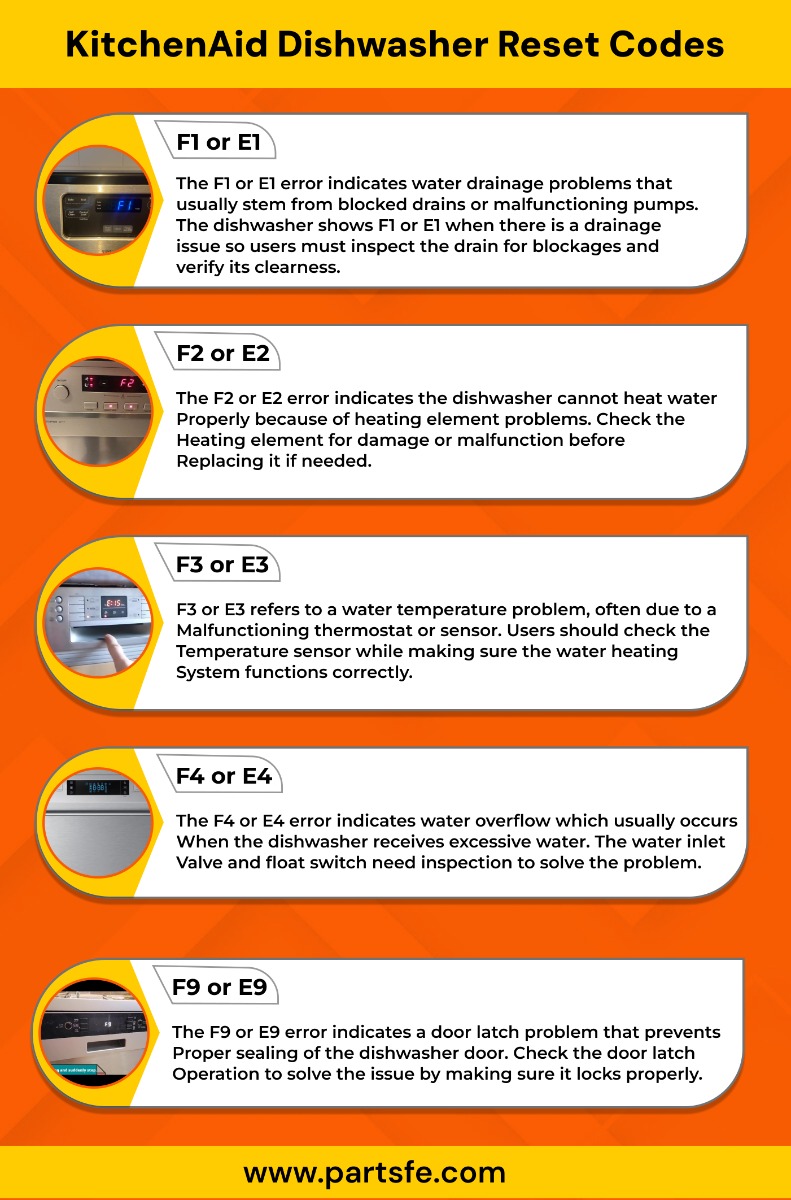
You should reset the dishwasher by following the manual reset procedure whenever error codes appear. You should contact a professional for repairs after resetting the dishwasher if the error code persists
How to Reset KitchenAid Dishwasher After a Power Outage
Power outages can disrupt the normal operation of your KitchenAid dishwasher, leading to unresponsive buttons, incomplete cycles, or flashing lights. To reset your dishwasher after a power outage:
-
Turn Off the Power: To completely shut down the power you should either unplug the dishwasher or switch off the circuit breaker. The electrical system of the appliance will reset through this procedure.
-
Wait for a Few Minutes: Let the dishwasher remain without power for 5-10 minutes to eliminate any brief system problems. The system reset process is completed successfully through this step.
-
Restore Power: The dishwasher can be powered up by plugging it in or flipping the circuit breaker to restore electrical connection. Restoring power to the appliance will make it operational again.
-
Start a New Cycle: After power is restored, you need to begin a new cycle to verify that the dishwasher operates properly. Verify if any problems persist after performing the reset.
In a few cases, a power surge during the outage could have triggered an internal error requiring a hard reset to resolve it.
Also read on: How to Fix a Commercial Dishwasher Drain Hose?
Troubleshooting a KitchenAid Dishwasher That Won’t Reset
If your KitchenAid dishwasher will not reset, begin by checking the power supply and make sure the appliance is properly plugged in. If that doesn't work, check the control panel for malfunctions or error codes that might point to other issues.
-
Check for Blockages: Examine drain and filter areas for any clogging materials which could stop the dishwasher from completing its reset process. Clear all blockages to enable normal machine operation.
-
Inspect the Door Latch:Check that the door latch is fully engaged because an open door prevents the dishwasher from performing its reset sequence. A proper functioning dishwasher requires a secure latch to operate correctly.
-
Reset the Control Panel:You can reset the control panel by pressing the "Cancel/Drain" button for multiple seconds. The reset operation clears all issues, so you can begin a new operation.
-
Check the Power Supply:Verify the dishwasher receives power by checking the circuit breaker because a reset will restore both power and functionality.
If you're experiencing issues with your dishwasher's soap dispenser door latch, our detailed guide on How to Fix Dishwasher Soap Dispenser Door Latch provides step-by-step instructions to help you resolve the problem efficiently.
A reset operation on your KitchenAid dishwasher serves as a basic solution for multiple dishwasher problems. A reset procedure can fix your dishwasher when it shows flashing clean lights, control panel malfunctions, and power interruptions. The steps in this guide enable you to fix various dishwasher problems without requiring professional help.
Regular maintenance tasks such as filter cleaning and blockage inspection will decrease the need for resetting your dishwasher. Further problems should lead you to seek professional help for dishwasher repair assistance. Learning to reset your KitchenAid dishwasher will help maintain its efficient operation throughout multiple years of use.
FAQs
What button do I press to reset my KitchenAid dishwasher?
To reset a KitchenAid dishwasher, you can unplug it from the power source for one minute and then plug it back in. If the dishwasher is hardwired, you can turn off the breaker at the electrical panel for one minute and then turn it back on.
How do you force a dishwasher to reset?
To force a dishwasher to reset, you need to unplug it from the power source for a minute or turn off the circuit breaker at your electrical panel that powers the dishwasher, then plug it back in or turn the breaker back on;
How do I reset my dishwasher control board?
To reset your dishwasher control board, typically you need to unplug the dishwasher from the power source for a minute, then plug it back in.
How do I clear the error code on my dishwasher?
To clear an error code on your dishwasher, usually you need to power cycle the appliance by turning it off completely at the circuit breaker for a few minutes, then turning it back on.