
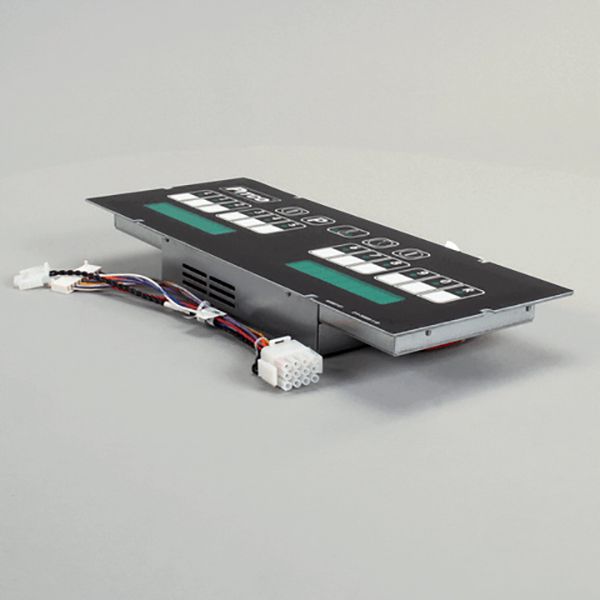
Pitco PT60126801-C Computer Display W/Harness SGL Green 24 VAC

Special Price $993.08 Regular Price $1,223.00
In stock
SKU
PT60126801-C
The Pitco PT60126801-C Computer Display with Harness is a control interface component with one green indicator and a 24VAC connection, which is compatible with gas fryers and related parts. It is mounted on the control panel of the appliance and connected through the harness to the control system, which makes it provide visual status feedback. It is a component of the control assembly that assists in conveying operating conditions and communicates with the user of the electronic system of the fryer.

Dimensions

  • Length: 17 In
  • Width: 7 In
  • Height: 3 In
  • Weight: 3.57 lbs
https://partsfe.com/media/catalog/product/p/i/pitco-pt60126801-c-24vac-computer-68721.jpg

Product Notes

  • 24Vac
Write Your Own Review
You're reviewing:Pitco PT60126801-C Computer Display W/Harness SGL Green 24 VAC
Your Rating
Customer Questions
What maintenance is required for the Pitco PT60126801-C Computer?

Regularly inspect the control board for dust, grease, or moisture buildup that can affect performance. Ensure all wiring connections are secure and free from corrosion or overheating. Verify proper ventilation to prevent heat accumulation during operation. Use stable power supply conditions to avoid electrical stress and intermittent failures.

What are common issues with the Pitco PT60126801-C Computer?

  • Unresponsive display or control interface failure.
  • Erratic operation due to voltage fluctuations or power issues.
  • Communication errors with connected fryer components.
  • Overheating or component failure from poor ventilation.

We strive to provide our customers with a hassle-free and efficient shopping experience. Our shipping policy ensures the timely delivery of your orders and complete customer satisfaction. View More

We are committed to ensuring your complete satisfaction with every purchase. We understand that circumstances may arise where you must return a product or request a refund. If for any reason you are not satisfied, you may return the item(s) according to the terms outlined below. View More

This Payment Policy outlines the terms and conditions governing all payments made for products purchased through our website. By making a purchase, you agree to be bound by this Payment Policy. View More

Installation Steps

Step1: Disconnect electrical power and ensure appliance is cool before starting.

Step2: Remove access panel and label existing wiring connections for reference.

Step3: Mount the 24VAC computer securely into the control bracket.

Step4: Reconnect wiring harnesses to matching terminals as per schematic.

Step5: Restore panel, then power on and test display and inputs.

Step6: Verify better operation and check for error codes, tighten connections if needed.