
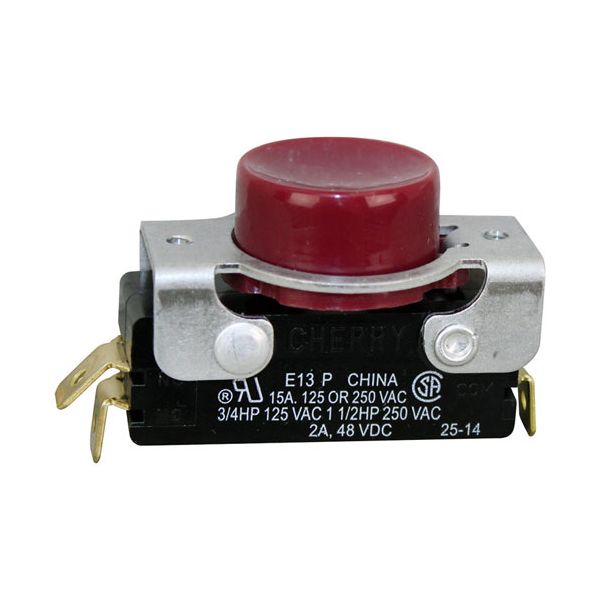
Hobart 00-087711-183-3 Push Button Switch On/Off Red

Special Price $34.40 Regular Price $44.68
In stock
SKU
00-087711-183-3
Manufacturer:

The Hobart 00-087711-183-3 Push Button Switch On/Off Red is used to switch the power to a mixer by opening or closing an electrical circuit to enable the appliance to be switched on or off. It has a red-type actuator that is easily identified and operated. The switch is fitted to the control panel of the mixer and fits into a pre-cut hole. The design provides an easy visual representation of the operational state of the mixer which enables the operators to safely start or stop the appliance when necessary.

Dimensions

  • Length: 2.75 In
  • Width: 1.25 In
  • Height: 1.5 In
  • Weight: 0.07 lbs
https://partsfe.com/media/catalog/product/h/o/hobart-00-087711-183-3-mom-on-off-red-switch-64051-2.jpg

Product Notes

  • Red Push Button Switch, Momentary Off/On, 2 Terminals
  • N/C Mixer On
  • Hobart Mixer
Write Your Own Review
You're reviewing:Hobart 00-087711-183-3 Push Button Switch On/Off Red
Your Rating
Customer Questions
What maintenance is required for the Hobart 00-087711-183-3 Switch?

Inspect the switch for smooth operation and verify the button returns fully after each press. Clean terminals of any dust or corrosion. Always disconnect power before performing any checks or adjustments.

What are common issues with the Hobart 00-087711-183-3 Switch?

  • Button sticks or fails to connect properly.
  • Terminal corrosion or loosening.
  • Faulty contact preventing proper operation.
  • Inconsistent on/off cycling.

We strive to provide our customers with a hassle-free and efficient shopping experience. Our shipping policy ensures the timely delivery of your orders and complete customer satisfaction. View More

We are committed to ensuring your complete satisfaction with every purchase. We understand that circumstances may arise where you must return a product or request a refund. If for any reason you are not satisfied, you may return the item(s) according to the terms outlined below. View More

This Payment Policy outlines the terms and conditions governing all payments made for products purchased through our website. By making a purchase, you agree to be bound by this Payment Policy. View More

Installation Steps

Step1: Disconnect power supply to avoid electrical shock.

Step2: Remove the control panel cover carefully.

Step3: Locate and detach the faulty switch wiring.

Step4: Install the new switch in the panel opening.

Step5: Reconnect wires to matching terminals securely.

Step6: Fasten the switch and reassemble the panel.

Step7: Restore power and test for proper operation.