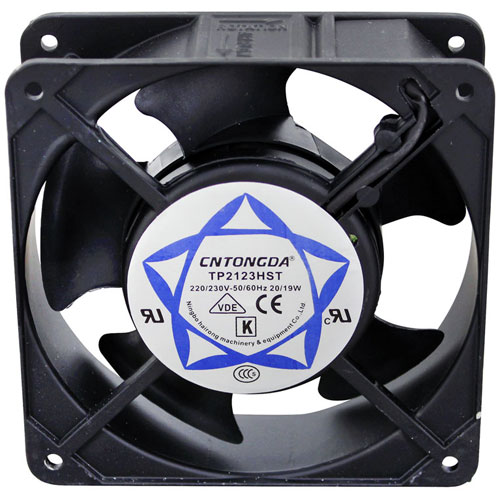

Blodgett 23034 Oven Axial Cooling Fan W/4-1/8" Hole Center 3100 RPM 220/240V
Specifications:
- Axial Fan, 220-240V, 2700/3100 RPM, 50/60Hz, 0.14/0.12Amp,
- 4-11/16" X 1-1/2", 4-1/8" Hole Centers, Looking At Frame-
- Cw, Air To You. Lead Wire Use # 38-1356
- American Permanent Ware Cmc-(24,36,48), Cmp-(24,36,48),
- Cmw-(24,36,48) Toaster At-10 .7/93 (Prior To 7/93 Used
- Regular Fan Motor Oem # 85151 & Fan Blade Oem # 85156).
- Bki Cob-E, Com-E
- Bakers Pride Bco-E, Gdco-E
- Blodgett Oven Mt2136E & Mt2136G For Export,
- Mt1820, Mt3855G, Mt3870.
- Carter-Hoffman Warmer Th15, Th-U, Th40, Th60
- Holman Oven Series: 210, 214, F24, F36, Ft2Bh.
- Toaster 314, 314H, 814, 814H, B710, B710H, T710,
- Dt14-M, Dt14-Ps, Dt14-Th, Dt14Sh, Qt14, Qt14R, Um3240,
Description
Dimensions:
- Weight: 1.4 lbs
- Length: 4.6 in
- Height: 1.5 in
- Width: 4.6 in
This Part Fits the Following Models
192 modelsALTO-SHAAM:
APW WYOTT:
BAKERS PRIDE:
BECKETT:
CARTER HOFFMAN:
CRES COR:
0769 029 K1 0769-029-K1 0769029K1
FRANKLIN CHEF:
HENNY PENNY:
PRINCE CASTLE:
SUNKIST:
VULCAN HART:
Step1: Disconnect power and allow unit to fully cool.
Step2: Remove rear panel to access cooling fan housing.
Step3: Disconnect wiring and remove mounting screws.
Step4: Install new fan in same position.
Step5: Reconnect wiring, secure panel, and test airflow on startup.
-
What maintenance is required for the Blodgett 23034 Axial Cooling Fan?
Regularly inspect the fan for dust, grease, and debris buildup that can restrict airflow. Check mounting hardware, wiring connections, and fan blades for damage or looseness. Keep ventilation paths clear to maintain proper cooling performance. Disconnect power before performing any inspection or cleaning to ensure safe servicing.
-
What are common issues with the Blodgett 23034 Axial Cooling Fan?
- Reduced airflow caused by obstructed or damaged fan blades
- Excessive noise or vibration during operation
- Fan motor failure resulting in no rotation
- Intermittent operation due to loose electrical connections
- Overheating from insufficient cooling airflow
- Fan running below rated speed and affecting equipment performance
Customer Reviews
Write a Review
-
Steady Air
Improves equipment performance prevents overheating effectively.
We strive to provide our customers with a hassle-free and efficient shopping experience. Our shipping policy ensures the timely delivery of your orders and complete customer satisfaction. View More
We are committed to ensuring your complete satisfaction with every purchase. We understand that circumstances may arise where you must return a product or request a refund. If for any reason you are not satisfied, you may return the item(s) according to the terms outlined below. View More
This Payment Policy outlines the terms and conditions governing all payments made for products purchased through our website. By making a purchase, you agree to be bound by this Payment Policy. View More