

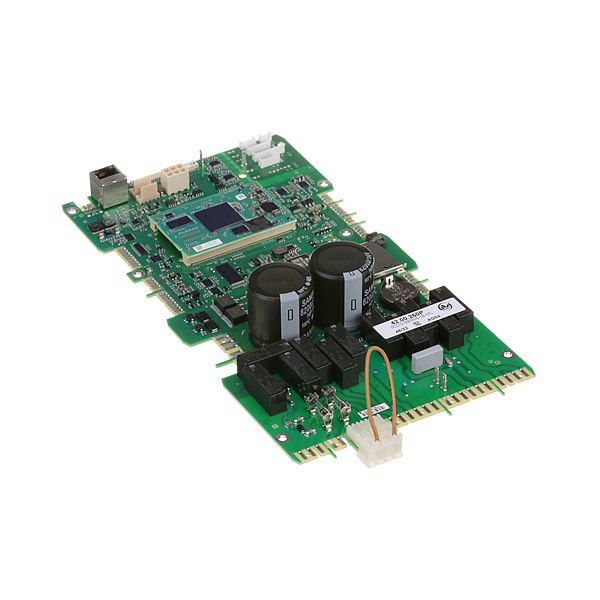
Rational 42.00.260P Control Board Sicotronic SCC_WE61-202

Special Price $1,671.69 Regular Price $2,262.95
In stock
SKU
42.00.260P
The Rational 42.00.260P PCB Control is the main electronic control board in the commercial appliance, and controls and coordinates all the operations. It operates by accepting input to user interfaces, sensors and timers and transmitting signals to heating components, fans, motors, and other parts to follow cooking programs. The PCB is fitted in compatible Rational combi ovens, which are usually fitted in the control compartment at the back of the front panel. It is a key component of temperature control, airflow, timing and system safety that ensures accurate and synchronized operation.

Dimensions

  • Length: 9 In
  • Width: 17.75 In
  • Height: 2.75 In
  • Weight: 2.1 lbs
https://partsfe.com/media/catalog/product/r/a/rational-42-00-260p-pcb-control-81722-2.jpg
Manufacturer Name: Rational
Product Number: 42.00.260P
OEM Part Number: 42.00.260P
Product Description: Control Pcb
Similar Models:42.00.080P - Rational
Dimensions:
Length:9in/22.86cm
Width:17.75in/45.08cm
Height:2.75in/6.98cm
Weight:2.1lbs/952.54g

Choose the best Commercial kitchen & Restaurant equipment parts and supplies from PartsFe!

  • Same Day Shipping

  • Best Quality And Best Price

  • Wide Range of Inventory

  • Best Customer Service

Have More Questions or Need Help to Place The Order?
Reach us at 866-863-0907 or contact@partsfe.com

More Information
Disable SaleableNo
Write Your Own Review
You're reviewing:Rational 42.00.260P Control Board Sicotronic SCC_WE61-202
Your Rating
Customer Questions
What maintenance is required for the Rational 42.00.260P PCB Control?

Keep the PCB clean and free from dust and moisture. Inspect connectors and wiring for corrosion or damage. Proper maintenance ensures stable control, accurate operation, and prevents electrical faults.

What are the common issues with the Rational 42.00.260P PCB Control?

  • Failure to power on or respond.
  • Intermittent or inconsistent signals.
  • Burnt traces or components from voltage spikes.
  • Corrosion or loose connectors affecting performance.
  • Temperature control errors or sensor communication failures.

We strive to provide our customers with a hassle-free and efficient shopping experience. Our shipping policy ensures the timely delivery of your orders and complete customer satisfaction. View More

We are committed to ensuring your complete satisfaction with every purchase. We understand that circumstances may arise where you must return a product or request a refund. If for any reason you are not satisfied, you may return the item(s) according to the terms outlined below. View More

This Payment Policy outlines the terms and conditions governing all payments made for products purchased through our website. By making a purchase, you agree to be bound by this Payment Policy. View More

Installation Steps

Step1: Turn off the power to the appliance completely.

Step2: Remove panels to access the old PCB control.

Step3: Disconnect all wiring from the old board, labeling connections.

Step4: Unscrew or unclip the old PCB control from its mounting.

Step5: Inspect the area for dirt, debris, or damage.

Step6: Install the new PCB control in the same orientation.

Step7: Reconnect all wiring according to labels.

Step8: Secure mounting screws firmly.

Step9: Restore power and run a test cycle.