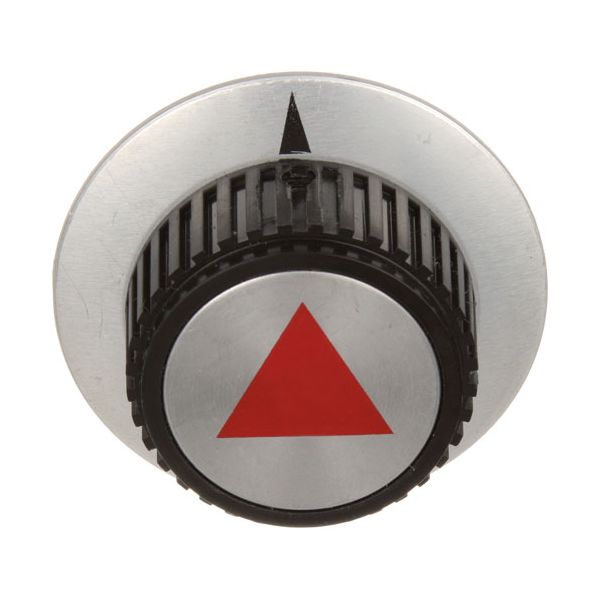
Vulcan Hart 00-824277 Indicator Knob

Special Price $48.96 Regular Price $70.63
In stock
SKU
00-824277
The Vulcan Hart 00-824277 Indicator Knob works by enabling it to be turned to a certain setting, and it acts as a visual guide to the appliance adjustments. It rotates around the control shaft in a smooth motion to specify the position selected. The knob is fitted to the control panel of compatible cooking equipment, and it fits directly on the panel, firmly in place. Its small size is such that it fits well with the existing controls, and replacing or upgrading existing knobs is easy.

Dimensions

  • Weight: 0.213 lbs
https://partsfe.com/media/catalog/product/v/u/vulcan-hart-00-824277-indicator-knob-44834-2.jpg
Controls and indicates selected equipment settings through a pointer-style interface. The Vulcan Hart 00-824277 Indicator Control Knob provides a clear visual reference as the connected control shaft is rotated, allowing operators to identify the selected position during operation. Its 2-1/2-inch diameter and indicator design provide an easy-to-read control surface, while the mounting configuration helps secure the knob to the control shaft.

Control Adjustment Operation:
Provides a direct manual interface for adjusting the equipment's control mechanism. When rotated, the knob transfers movement through the connected control shaft, allowing operators to select designated operating positions from the front control panel. This supports controlled and repeatable adjustment during normal equipment operation.

Control Position Indication:
The indicator marking on the knob provides a clear visual reference for the selected control position. As the knob rotates, the indicator moves relative to the markings on the front control panel, allowing the operator to recognize the current setting at a glance. This helps provide a consistent reference when selecting or returning to a particular operating position.

Replacement Guidelines:
Replace the Indicator Control Knob if it is cracked, broken, worn, loose, deformed, or no longer provides proper control positioning or indication. The part number 00-824277 should be verified before replacement to ensure the correct indicator knob is selected. Replace the knob if deterioration affects control positioning, secure fit, visibility of settings, or normal equipment operation.

Common Failure Symptoms:

  • Knob becomes loose or slips on the control shaft.
  • Cracks, breaks, or physical damage to the knob body.
  • Faded or unclear indicator markings.
  • Difficulty turning or adjusting the control smoothly.
  • Worn internal hub causing poor grip or inconsistent rotation.
  • Pointer no longer aligns correctly with the control settings.

Equipment Compatibility:
Designed for Vulcan Hart commercial cooking equipment with compatible control shaft and front panel configurations. The 00-824277 indicator Control Knob is intended for equipment that uses the corresponding control interface. Verify the equipment model and part number before ordering to help ensure the correct component is selected.

Technical Specifications:
Brand: Vulcan Hart.
Part Number: 00-824277
Component Name: Indicator Control Knob

Write Your Own Review
You're reviewing:Vulcan Hart 00-824277 Indicator Knob
Your Rating
Customer Questions
What is the Best Electric Griddle?

Electric Griddle is an electronic equipment that uses an electric element as its heat source. It has a large cooking surface often made up of nonstick material. Electric Griddle has a surface which you do not find in the regular stovetop cookware. ...

What maintenance is required for the Vulcan Hart 00-824277 Indicator Knob?

Regularly inspect the knob for cracks, looseness, or fading markings to ensure accurate temperature or setting control. Clean the surface gently to remove grease and debris that may affect visibility or grip. Ensure the internal shaft connection remains secure for proper adjustment functionality. Replace the knob if it becomes damaged or difficult to turn to maintain safe operation.

What are common issues with the Vulcan Hart 00-824277 Indicator Knob?

  • Knob becomes loose or wobbly.
  • Indicator markings fade or wear off.
  • Difficulty turning the knob smoothly.
  • Cracking or breaking under pressure.

How does the Vulcan Hart 00-824277 indicator knob assist during operation?

It provides a manual control point for adjusting equipment settings, while the indicator marking shows the selected control position.

How does the indicator knob interact with the control shaft?

Turning the knob transfers rotational movement to the connected control shaft, allowing the internal control mechanism to change positions.

Why is the indicator marking important?

The marking provides a visible reference that helps operators identify the selected setting on the control panel.

We strive to provide our customers with a hassle-free and efficient shopping experience. Our shipping policy ensures the timely delivery of your orders and complete customer satisfaction. View More

We are committed to ensuring your complete satisfaction with every purchase. We understand that circumstances may arise where you must return a product or request a refund. If for any reason you are not satisfied, you may return the item(s) according to the terms outlined below. View More

This Payment Policy outlines the terms and conditions governing all payments made for products purchased through our website. By making a purchase, you agree to be bound by this Payment Policy. View More

Installation Steps

Step1: Turn the appliance off before servicing.

Step2: Pull the existing knob straight off the control shaft.

Step3: Align the new knob with the shaft’s flat or keyed side.

Step4: Push the knob firmly into place until fully seated.

Step5: Verify smooth rotation and proper indicator alignment.