
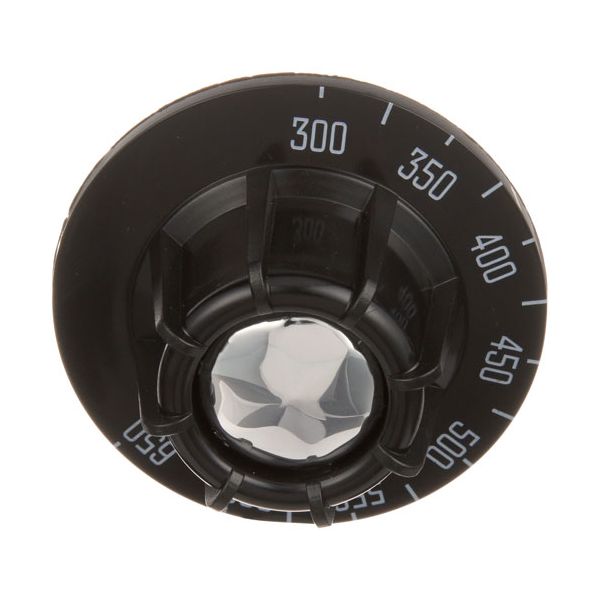
Blodgett BL10392 Dial 2-1/2" DIA 300-650°F

Special Price $19.92 Regular Price $33.10
In stock
SKU
BL10392
Manufacturer:

The Blodgett BL10392 Dial 2-1/2" DIA 300-650°F is an internal temperature sensor that reacts to changes in heat and converts this into a readout of a needle position on a marked scale. The detector system responds in a range of 300-650°F to show the operating conditions in heating cycles. This is normally placed on the control panel or front face of commercial cooking equipment so that it can be seen. Its analog design allows it to be used in other foodservice parts that require a stable heat display.

Dimensions

  • Length: 2.5 In
  • Width: 1.25 In
  • Height: 1.25 In
  • Weight: 0.1 lbs
https://partsfe.com/media/catalog/product/b/l/blodgett-bl10392-dial-2-1-2-d-300-650-73760-2.jpg

Product Notes

  • Black W/White Print Dial For Fd T'Stat
  • [ 2-1/2" Dia ] [ 300-650] [Mount .290"] [ Flat Down ]
  • Bakers Pride Oven 104P, 151, 204P, 251, 304P,351, 404P,
  • 451,922, 932, Y600, Y612. Series: 805, D125.
  • Blodgett Oven Pizza Ovens: 999, 1000, 1048, 1060-Fai.
  • Series: 900 Roast & Bake.
  • Lincoln Oven Series: 1000, 1200.
  • Montague Oven 13P-1, 14P-1, 23P-2, 24P-2.
  • Vulcan Oven Gh3/72, Gh3/72C, Gh3/72S, Gh30, Gh30C, Gh45,
  • Gh45/72, Gh56, Gh56S, Gh6, Gh60, Gh60/45, Gh60/72, Gh6045C,
  • Gh60T, Gh60T/45, Gh60T/72, Gh6C, Gh6S, Gh6T45C, Gh72,
  • Gh72/45, Ghm3/72, Ghm30, Ghm30C, Ghm45, Ghm45/72, Ghm56,
  • Ghm6, Ghm60, Ghm60/45, Ghm60/72, Ghm60T, Ghm60T/45,
  • Ghm60T/72, Ghm72, Ghm72/45, Lobster
BAKERS PRIDE:
-S1053X, -S1056A, -S1056X, 2R-S1056A, BKPS1056A, BKPS1056X, S1056A, S1056X
BLODGETT:
-10392, 10392, BL10392
JADE RANGE:
LINCOLN:
-369108, 369108
MARSAL AND SONS:
MONTAGUE:
-01976-3, -1976-3, -P-12B-1, 01976-3, 1976-3, P-12B-1
U-LINE:
4590-079
Write Your Own Review
You're reviewing:Blodgett BL10392 Dial 2-1/2" DIA 300-650°F
Your Rating
Customer Questions
What maintenance is required for the Blodgett BL10392 Dial?

Keep the dial face clean and free of grease to ensure clear temperature readings. Inspect the indicator pointer for alignment accuracy and check for looseness on the shaft. Avoid excessive force when turning to prevent internal damage.

QuestWhat are common issues with the Blodgett BL10392 Dial?

  • Faded or hard-to-read markings.
  • Loose or slipping dial on shaft.
  • Misaligned temperature indicator.
  • Cracked or damaged dial face.
  • Inaccurate temperature positioning.
  • Damage on internal mounting hub.

We strive to provide our customers with a hassle-free and efficient shopping experience. Our shipping policy ensures the timely delivery of your orders and complete customer satisfaction. View More

We are committed to ensuring your complete satisfaction with every purchase. We understand that circumstances may arise where you must return a product or request a refund. If for any reason you are not satisfied, you may return the item(s) according to the terms outlined below. View More

This Payment Policy outlines the terms and conditions governing all payments made for products purchased through our website. By making a purchase, you agree to be bound by this Payment Policy. View More

Installation Steps

Step1: Turn off and unplug the oven to ensure safety.

Step2: Remove the old dial by pulling it straight off the control shaft.

Step3: Align the new dial with the shaft’s flat edge.

Step4: Push the dial firmly into place until secure.

Step5: Rotate to verify smooth movement and proper alignment.

Step6: Restore power and test temperature settings for accuracy.